
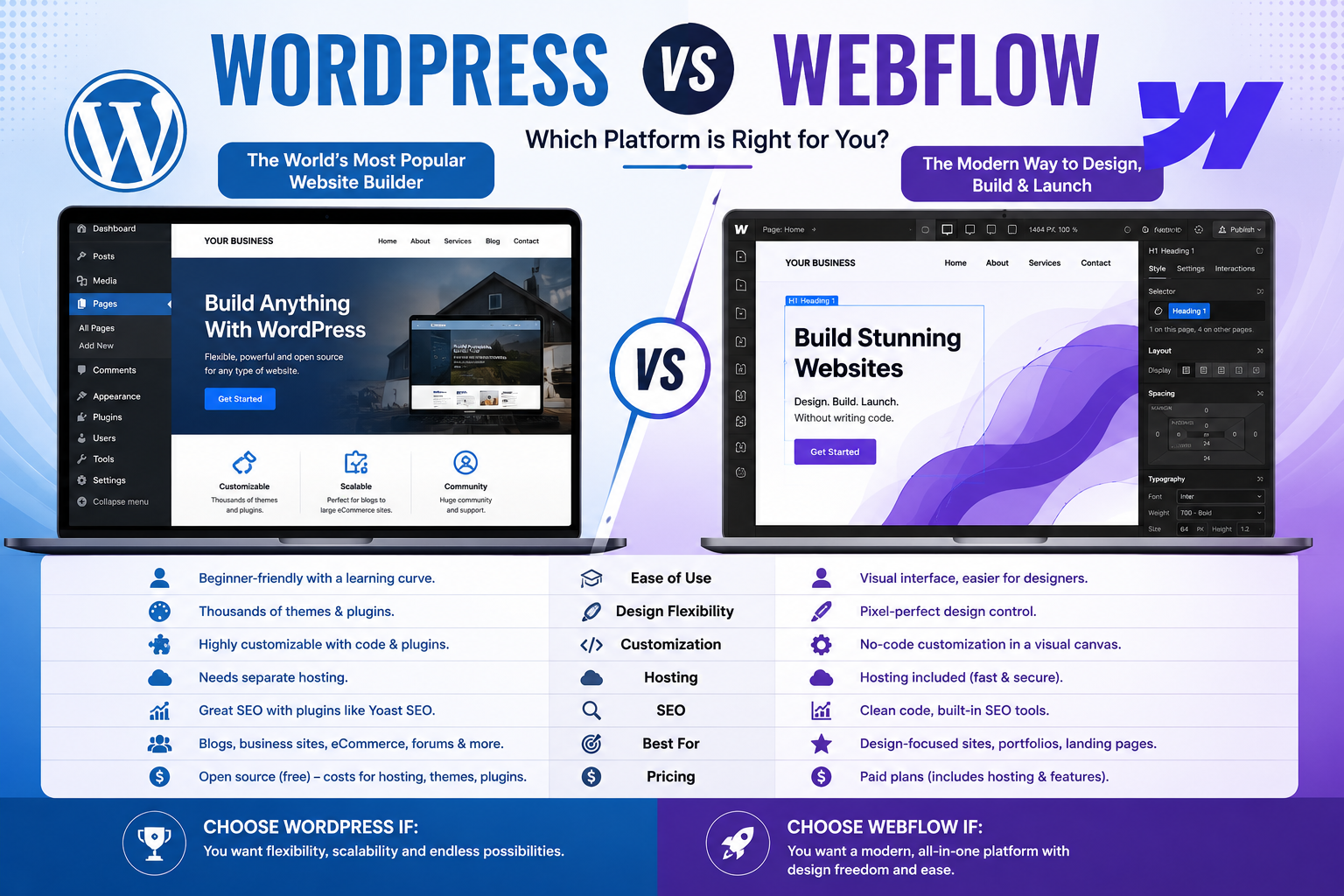
Picking a website platform feels like a bigger decision than it should be mostly because everyone with a stake in the answer has an opinion. Developers push custom code. Designers love Webflow. Agencies default to WordPress because it’s what they know. None of that tells you which one is actually right for your business.
So let’s strip out the bias and look at what each platform actually costs, where it breaks down, and who it genuinely suits. This is one of the most common questions we get asked, and in the interest of full transparency this very site runs on WordPress. We’ll explain exactly why further down, along with the cases where we’d tell a client to choose something else entirely.
The Verdict, at a Glance
| WordPress | Webflow | Custom Code | |
| Best for | Content-heavy sites, blogs, SEO-first businesses | Design-led brands, marketing sites, small teams without developers | Complex logic, unique functionality, long-term scale |
| Upfront cost | Low–Medium | Low–Medium | Medium–High |
| Ongoing cost | Medium (hosting, plugins, maintenance) | Low–Medium (subscription-based) | Low–Medium (but developer-dependent) |
| Ease of editing | Good, with training | Excellent for design tweaks | Depends entirely on build |
| SEO capability | Excellent | Very good | Excellent, if built correctly |
| Flexibility | High (via plugins) | Medium | Unlimited |
| Developer lock-in | Low | Medium | High |
| Security burden | On you (updates, patches) | Handled by Webflow | On you or your developer |
| Typical timeline | 2–6 weeks | 2–4 weeks | 6–16+ weeks |
If you want the short answer: WordPress suits most small and medium UK businesses that need strong SEO and content flexibility without ongoing developer fees. Webflow suits design-conscious brands that want a polished site with less maintenance overhead. Custom code suits businesses with functionality no off-the-shelf CMS can handle. The rest of this guide explains why.
WordPress: The Established Workhorse
WordPress now powers a huge share of the web, and for good reason it’s mature, endlessly extendable, and backed by the largest developer community of any CMS.
Pros
- Unmatched plugin ecosystem. Whatever functionality you need for booking systems, membership areas, multilingual content, e-commerce via WooCommerce there’s almost certainly a plugin for it.
- SEO-friendly by design. Tools like Yoast and Rank Math give semi-technical users granular control over meta data, schema, sitemaps and internal linking without touching code.
- Content flexibility. Built for publishing. If your growth strategy depends on regular blogging, resource hubs or landing pages, WordPress handles volume better than most alternatives.
- No developer lock-in. Because it’s open-source and widely used, you’re never tied to one agency or freelancer. Any competent WordPress developer can pick up an existing site.
- Lower long-term cost. Hosting is cheap and widely available, and most day-to-day changes can be made in-house once the site is set up.
Cons
- Security is your responsibility. WordPress’s popularity makes it a common target. Core, theme, and plugin updates need to be kept current, and a managed security plugin or hosting package is close to non-negotiable.
- Plugin bloat. It’s easy to end up with a dozen plugins doing overlapping jobs, which slows the site down and increases the surface area for conflicts.
- Maintenance overhead. Updates, backups, and monitoring need someone accountable whether that’s an internal admin or a retained developer.
- Design can look templated if you’re relying on a page builder without design input.
Cost
Budget roughly £2,000–£8,000 for a professionally built small business site, plus £10–£50/month for hosting and £50–£150/month if you retain a developer for ongoing maintenance and security updates.
Best for
Service businesses, e-commerce via WooCommerce, and any company whose marketing strategy leans on content and organic search. If SEO is your primary acquisition channel, WordPress remains the safest long-term bet.
Webflow: Design Control Without the Developer Queue
Webflow occupies a middle ground a visual builder that outputs clean code, aimed at teams who want design precision without hiring a developer for every change.
Pros
- Design freedom. Webflow gives designers pixel-level control that page builders like Elementor struggle to match, without writing HTML/CSS by hand.
- Hosting and security included. Webflow handles hosting, SSL, CDN and core security as part of the subscription no plugin updates, no patching.
- Clean, fast output. Because there’s no plugin stack, Webflow sites are typically lighter and faster out of the box.
- Built-in CMS. Good for structured content (case studies, team bios, portfolio items) without needing a developer to build custom post types.
- Solid SEO fundamentals. Clean code, fast load times, and straightforward control over titles, meta descriptions, and URL structures.
Cons
- Subscription dependency. You’re paying monthly indefinitely, and costs scale with traffic, CMS items, and team seats.
- Developer lock-in is real, just different. Complex logic, integrations, or membership functionality often require Webflow-specific expertise, and migrating away later means rebuilding, not exporting a working site.
- Less suited to high-volume publishing. It’s capable, but not built for a business publishing dozens of blog posts a month the way WordPress is.
- Limited backend flexibility. Anything outside Webflow’s native feature set usually needs third-party tools stitched in via API or embed, which adds fragility.
Cost
Typical build cost for a small business site: £2,500–£10,000, depending on design complexity. Ongoing Webflow hosting plans generally run £20–£40/month per site, on top of any CMS or business plan tier needed for content volume.
Best for
Brands where visual polish is a competitive differentiator professional services, studios, consultancies and businesses that want to avoid hands-on maintenance entirely.
Custom Code: Built for Exactly What You Need
A fully custom build means no CMS constraints a site built from scratch (or on a lightweight framework) to do precisely what your business requires, and nothing it doesn’t.
Pros
- No functional ceiling. If your business needs bespoke logic, a custom quoting tool, unusual integrations, a proprietary dashboard custom code is often the only route that doesn’t involve compromise.
- Performance control. Nothing is loaded that isn’t needed. For businesses where every fraction of a second of load time matters, this can be a genuine edge.
- Full ownership of the architecture. No dependency on a CMS vendor’s roadmap or a page builder’s limitations.
- Scales precisely with your business, rather than being reshaped to fit a platform’s assumptions.
Cons
- Highest upfront cost and longest timeline. Everything is built rather than configured, which takes more time and more budget.
- Developer lock-in. Editing content, adding features, or fixing bugs typically requires the original developer or a similarly skilled one there’s no plugin marketplace to fall back on.
- You own the security and maintenance burden entirely, without the safety net of a large open-source community patching vulnerabilities.
- Overkill for most small businesses. The functionality that justifies custom code is a genuine minority use case.
Cost
Realistically £8,000–£40,000+ depending on scope, with ongoing developer retainer costs for maintenance, updates, and any new features.
Best for
Businesses with functionality that genuinely can’t be served by an off-the-shelf CMS SaaS products, marketplaces, complex booking or logistics systems, or platforms with heavy custom integrations.
Migration Considerations: What Happens Later
Nobody wants to think about switching platforms before they’ve launched, but it’s worth planning for because migration difficulty varies enormously.
- WordPress → anything else. Content and URL structures export relatively cleanly, since WordPress data is portable and well-documented. This is generally the easiest platform to migrate away from, which is part of why it carries less long-term risk.
- Webflow → anything else. Design isn’t portable in the same way. Moving off Webflow usually means rebuilding pages and CMS structures rather than exporting a working site, so treat a Webflow decision as a longer-term commitment.
- Custom → anything else. Entirely dependent on how the original build was documented and structured. A well-documented custom build can migrate smoothly; an undocumented one can mean starting again.
- SEO continuity matters most. Whatever platform you move to or from, preserving URL structure (or implementing correct 301 redirects), meta data, and internal linking is what protects rankings during a migration; the platform itself is secondary to how the move is executed.
If there’s a realistic chance you’ll outgrow your first platform, it’s worth building with that migration path in mind from day one rather than treating it as a future problem.
Why We Run on WordPress
We build client sites on all three platforms, and this site itself runs on WordPress. That’s not an accident or a case of “sticking to what we know” for a business like ours, publishing regularly, targeting long-tail search terms, and needing full control over technical SEO without ongoing platform subscription costs, WordPress was the clearest fit. We weighed the maintenance overhead against the SEO and content flexibility it gives us, and for our specific goals, it won out.
That said, we’ve recommended Webflow to clients where design consistency mattered more than publishing volume, and we’ve built fully custom platforms for clients whose core product logic simply couldn’t live inside a CMS. The right platform depends on what the business needs the site to do not on which one is trendiest.
FAQs
Is WordPress outdated?
No it remains one of the most widely used and actively developed content management systems, with regular core updates and a large security research community. What’s outdated is treating it as a “set and forget” platform. A neglected WordPress site with unpatched plugins is a real security risk; a properly maintained one is not.
Which is best for SEO?
All three can perform excellently for SEO when built correctly SEO success depends far more on site structure, page speed, content quality, and technical implementation than on platform choice alone. WordPress has an edge for content-heavy strategies thanks to mature SEO plugins and easy content scaling. Webflow performs very well on technical fundamentals like speed and clean code. Custom builds can match either, but only if SEO is planned for from the start rather than bolted on afterward.
Can I move platforms later?
Yes, but the difficulty varies. Moving away from WordPress is typically the most straightforward, since content is portable and well-structured. Moving away from Webflow or a custom build usually means more rebuilding than exporting. If you’re unsure which platform to commit to, it’s worth choosing the one that best fits your current needs while keeping migration cost in mind as a secondary factor, not the deciding one.
Not Sure Which Fits Your Business?
We build on WordPress, Webflow, and fully custom stacks which means our recommendation isn’t tied to pushing you toward whichever platform we happen to specialise in. Get in touch and we’ll give you an honest, unbiased recommendation based on what your business actually needs.