
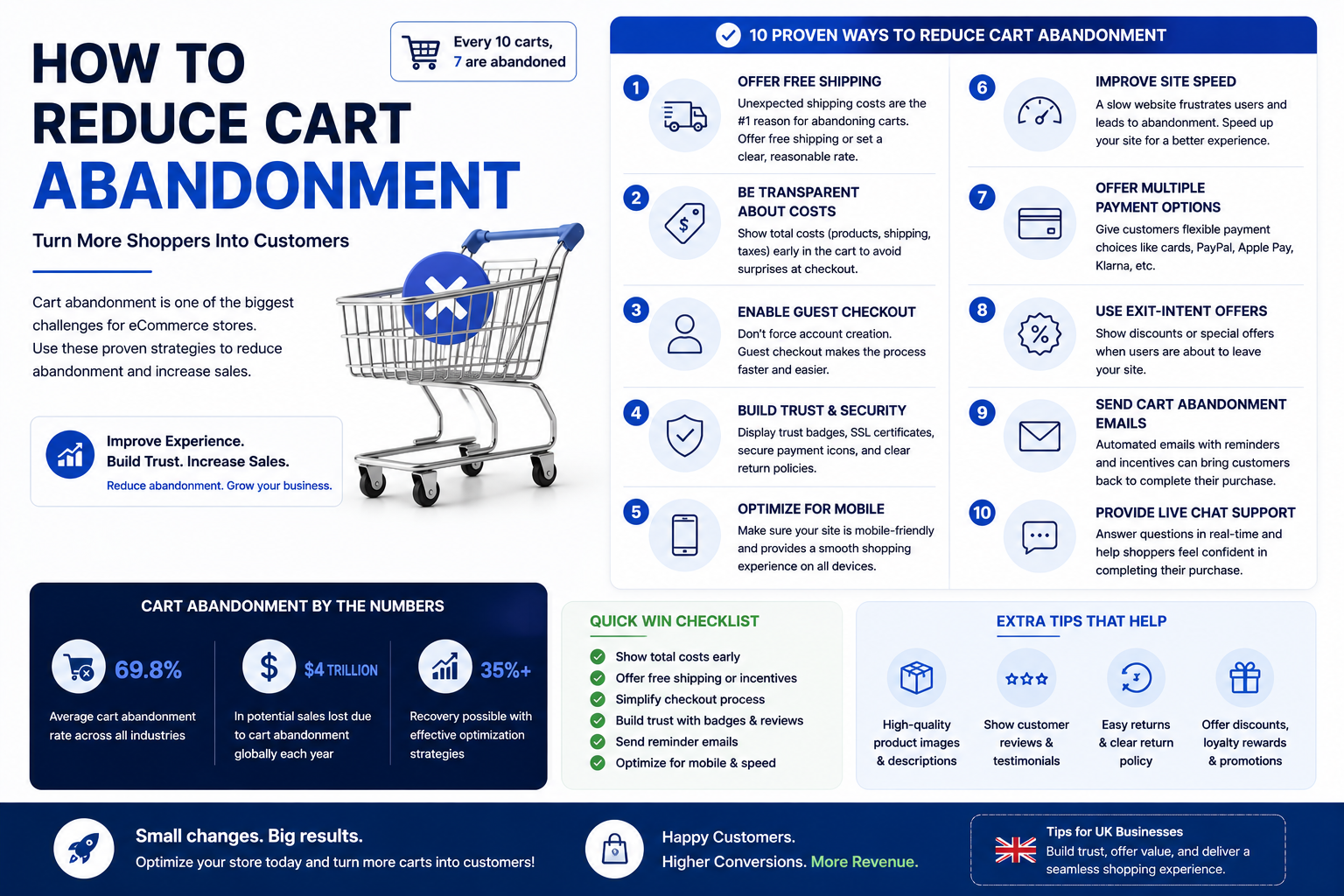
If you’ve ever pulled a checkout report and winced, you’re not alone. Across e-commerce, roughly 7 in 10 shoppers add something to their cart and then leave without paying. That’s not a rounding error, it’s the single biggest leak in most online stores’ revenue funnel.
The good news: cart abandonment isn’t one problem. It’s a stack of small frictions: a surprise shipping fee, a forced account signup, a checkout page that loads slowly on mobile and each one is fixable on its own. You don’t need a full replatform to move the needle. Most stores see meaningful recovery just by tightening the checkout experience and following up with the right emails at the right time.
Here’s a quick look at where shoppers actually drop off before we get into the fixes:
Below are 12 proven fixes, grouped into four categories: checkout UX, trust signals, pricing transparency, and recovery tactics for the sales you’ve already lost.
Part 1: Checkout UX Fixes
Most abandonment happens because checkout asks for more effort than the shopper is willing to give at that moment. These four fixes remove friction directly.
1. Offer Guest Checkout
Forcing account creation before purchase is one of the most reliable ways to lose a sale. Shoppers who are ready to buy don’t want to pick a password they want to pay and get a confirmation email. Making an account optional, and offered after the order completes, keeps the path to purchase as short as possible while still letting you capture repeat customers who want one.
2. Move to a One-Page Checkout
Every extra page or step in checkout is another chance for someone to close the tab. A one-page checkout shipping, billing, and payment visible together, with smart defaults (like auto-filling billing from shipping) cuts the perceived effort dramatically. If a single page feels cramped, a clear progress bar across 2–3 steps is the next best option; just avoid open-ended multi-page flows with no sense of “how much is left.”
3. Optimize for Mobile First
A large share of cart abandonment traffic is mobile, and mobile checkouts fail in specific, fixable ways: tiny tap targets, keybohtml that doesn’t match the field (numeric keypad for card numbers, email keyboard for email), and forms that don’t autofill. Test your actual checkout on a phone, not just a desktop browser resized smaller the two experiences behave differently.
4. Speed Up Page Load
Checkout pages are often the most script-heavy pages on a site, loaded with tracking pixels, chat widgets, and upsell scripts. Every extra second of load time at this exact moment when the shopper has already decided to buy costs you conversions. Audit third-party scripts on the checkout page specifically and strip anything non-essential.
Part 2: Trust Fixes
Shoppers abandon carts when they’re not sure the site is safe to pay on, especially on stores they haven’t bought from before.
5. Display Trust Badges Near Payment Fields
Security badges, payment provider logos (Visa, Mastercard, PayPal, etc.), and SSL indicators reassure shoppers at the exact moment they’re about to hand over card details. Place them near the payment form itself, not buried in the footer proximity to the point of hesitation is what makes them effective.
6. Show Real Reviews and Social Proof
A star rating and review count near the product or in the cart sidebar reduces last-second doubt. This matters most for newer stores or unfamiliar brands, where the shopper’s biggest question isn’t “do I want this” but “can I trust this business.”
7. Make Your Return Policy Visible
An unclear or hard-to-find return policy creates hesitation, especially for clothing, electronics, and higher-priced items. A short, clear line (“Free returns within 30 days”) near the add-to-cart button or in the cart itself removes a common reason for last-minute doubt.
8. Use a Recognizable Payment Processor
Shoppers are more likely to complete checkout when they see a payment brand they recognize and trust. If your processor’s checkout page looks generic or unfamiliar, or redirects to an unbranded domain, that unfamiliarity itself can cause hesitation.
Part 3: Pricing Transparency Fixes
Surprise costs at the final step are consistently cited as one of the top reasons shoppers abandon carts often ahead of price itself.
9. Show Shipping Costs Early
Nothing kills momentum like reaching the final screen and discovering shipping adds $12 to a $30 order. Show shipping costs or at least a clear estimate on the product page or in the cart, before the shopper reaches checkout. If you can offer a shipping calculator based on zip code before checkout, even better.
10. Display the Full Price Breakdown in the Cart
Tax, shipping, and any fees should appear in the cart itself, not just on the final checkout page. A shopper who sees the full total early has already mentally committed by the time they reach payment; a shopper who sees it for the first time at the last step is primed to bail.
11. Consider a Free Shipping Threshold
A free-shipping threshold (“Free shipping over $50”) does two things at once: it removes the shipping-cost surprise entirely for a chunk of orders, and it nudges average order value up as shoppers add items to qualify. Just make sure the threshold is visible in the cart, with a running total of how much more they need to add.
Part 4: Recovery Fixes
Even with a great checkout, some percentage of carts will always go unpaid. This is where you win sales back after the fact.
12. Run an Abandoned Cart Email Sequence
Abandoned cart emails are one of the highest-ROI tactics in e-commerce email marketing, because they target people who already showed strong intent to buy. A well-built sequence typically looks like:
- Email 1 (1 hour later): A simple reminder “You left something in your cart” with a product image and a direct link back to checkout.
- Email 2 (24 hours later): Add urgency or address a likely objection low stock, a customer review, or answers to common questions.
- Email 3 (48–72 hours later): A small incentive free shipping or a modest discount to convert the shoppers who needed one last nudge.
Pair this with exit-intent popups on desktop (offering a discount or capturing an email the moment a shopper moves to close the tab) to catch some of that traffic before it ever leaves as an abandoned cart in the first place. Remarketing ads on Meta and Google that follow abandoners with the exact product they viewed add a second recovery layer beyond email alone.
Prioritization Matrix: What to Fix First
Not every store needs all 12 fixes at once. Here’s how to prioritize based on effort versus impact:
| Fix | Impact | Effort | Priority |
| Show shipping costs early | High | Low | Do first |
| Guest checkout | High | Low | Do first |
| Abandoned cart emails | High | Medium | Do first |
| One-page checkout | High | Medium | Next |
| Trust badges near payment | Medium | Low | Next |
| Full price breakdown in cart | Medium | Low | Next |
| Mobile checkout optimization | High | Medium | Next |
| Exit-intent popups | Medium | Low | Quick win |
| Free shipping threshold | Medium | Medium | Plan in |
| Visible return policy | Low | Low | Quick win |
| Recognizable payment processor | Medium | Medium | Plan in |
| Remarketing ads | Medium | Medium | Plan in |
If you only do three things this month: show shipping costs early, enable guest checkout, and turn on an abandoned cart email sequence. Those three alone address the top reported causes of abandonment and typically the fastest wins.
Case Study: What a Checkout Rebuild Actually Recovers
We rebuilt the checkout flow for one of our e-commerce clients, moving them from a forced-account, multi-page checkout to a one-page, guest-friendly flow with upfront shipping costs and a three-email abandoned cart sequence. The result: a 40% lift in checkout conversion rate within the first full month post-launch, with the abandoned cart sequence alone recovering a meaningful share of previously lost carts.
The pattern held with what you’d expect from the data above the biggest single jump came from removing the forced signup and surfacing shipping costs before the final step, not from any one “clever” trick.
Our last checkout rebuild lifted conversions 40% get yours audited.
FAQs
What’s a normal cart abandonment rate? Across e-commerce broadly, abandonment rates around 70% are typical, though this varies by industry, device, and traffic source. Mobile traffic tends to run higher than desktop, and stores with unexpected shipping costs or forced account creation often sit well above average. Rather than chasing an arbitrary “good” number, track your own rate over time and treat any downward trend after a fix as a signal it worked.
Do abandoned-cart emails actually work? Yes they’re consistently one of the better-performing email types in e-commerce because they target shoppers who already demonstrated buying intent. A simple three-email sequence (reminder, objection-handling, small incentive) recovers a real percentage of otherwise-lost sales, and the setup is largely one-time work once your platform supports it.
What are the best checkout plugins? The right choice depends on your platform. On Shopify, the native checkout combined with apps for cart recovery and one-click upsells covers most needs. On WooCommerce, plugins that add guest checkout, a distraction-free one-page layout, and built-in cart abandonment emails are common starting points. If you’re unsure which fits your store’s setup, that’s worth a quick audit rather than guessing.