
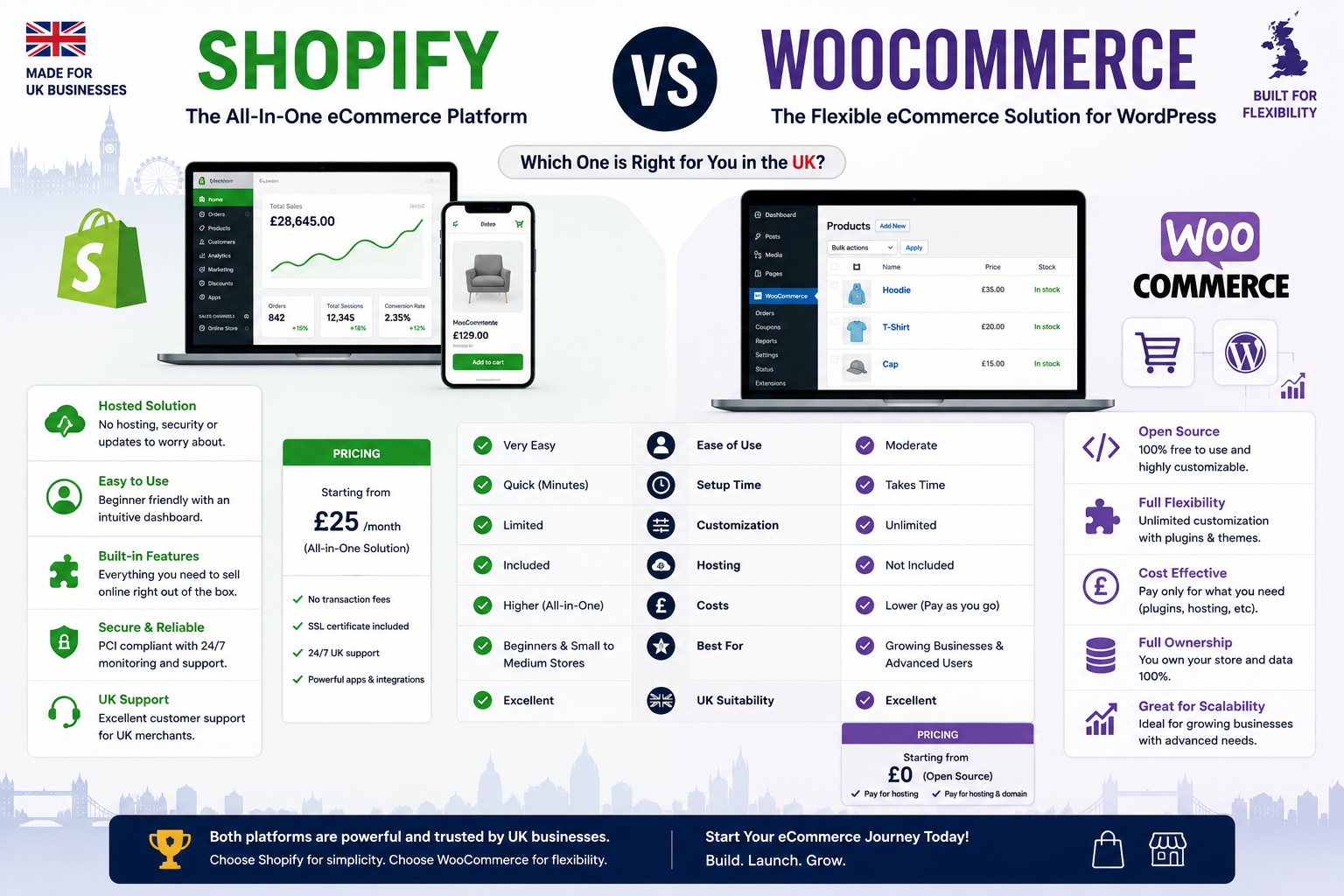
If you’ve spent any time researching this, you’ll already know the internet is full of “it depends” articles that never actually tell you anything. So let’s start with the answer, then back it up with the numbers.
The Verdict, Upfront
Choose Shopify if you want a store to live in days, don’t want to think about hosting or security, and are happy trading a bit of monthly cost for zero maintenance.
Choose WooCommerce if you already run WordPress (or want full content/SEO control), you’re comfortable or have a developer who is managing a self-hosted site, and you want to avoid Shopify’s per-transaction fees on Shopify Payments alternatives.
Neither is “cheaper” by default. Shopify’s costs are predictable and bundled. WooCommerce’s costs are lower on paper but split across hosting, plugins and a developer’s time and can creep past Shopify’s total if you’re not careful.
We build both platforms at MDOB, but the majority of our client work is WooCommerce, so it’s worth saying that plainly. We’ll flag Shopify’s genuine strengths throughout rather than quietly stacking the deck.
The Real Cost Comparison for UK Stores
The headline monthly price is the least useful number either platform publishes. Here’s how that breaks down for a typical small-to-mid UK store in 2026.
| Cost Item | Shopify | WooCommerce |
| Core platform | Basic £19–25/mo, Grow £49–65/mo, Advanced £259/mo | Free (open-source plugin) |
| Hosting | Included in plan | £5–£200+/mo depending on host and traffic |
| Domain & SSL | Included/from ~£10/yr | £10–£15/yr domain; SSL usually included with hosting |
| Transaction fees (Shopify Payments) | Basic 2.0% + 25p, Grow 1.7% + 25p, Advanced 1.5% + 25p | None WooCommerce doesn’t charge its own transaction fee |
| Transaction fees (Stripe, either platform) | Add 0.5–2% extra if you skip Shopify Payments for a third-party gateway | Stripe UK: roughly 1.5% + 20p per transaction |
| Themes | Free options, or £150–£350 one-off for premium | Free (Storefront), or £40–£150/yr for premium |
| Essential apps/plugins | £50–£200/mo for a typical store (reviews, SEO, email) | £150–£800/yr across a handful of essential extensions |
| Developer/maintenance time | Minimal Shopify handles updates and security | Ongoing plugin updates, backups, security patching |
Shopify’s transaction fee only bites if you don’t use Shopify Payments. If you do use it (available to most UK merchants), you pay the card processing rate 2.0% + £0.25 per transaction on Basic, dropping to 1.7% + £0.25 on Grow and no separate Shopify cut. Skip Shopify Payments in favour of a third-party gateway and you’ll pay an additional fee on top of card processing, which is the trap a lot of comparison articles gloss over.
WooCommerce genuinely doesn’t charge a platform transaction fee. WooCommerce charges no transaction fees itself; all payment costs come from whichever gateway you choose. For a UK store, Stripe typically charges around 1.5% + 20p per transaction, which is lower than Shopify’s Basic-tier rate and roughly on par with Shopify’s higher tiers but you’re paying it regardless of plan, because there’s no plan to upgrade out of it.
The break-even point on Shopify plans is real. The lower transaction fees on Shopify’s Grow plan start paying for themselves once monthly revenue passes roughly £15,000, since the 0.3% saving on processing outweighs the higher subscription cost.
WooCommerce’s “free” core plugin isn’t a free store. Once you add proper hosting, a handful of essential extensions, and either your own time or a developer’s, most realistic WooCommerce builds land somewhere between a few hundred pounds and several thousand a year
the range depends almost entirely on scale and how much you self-manage.
Ease of Setup and Ongoing Use
Shopify wins this one cleanly, and there’s no honest way to argue otherwise.often in an afternoon. Updates, security patches, PCI compliance and server uptime are all Shopify’s problems, not yours. If you want to spend zero time thinking about “the back end,” Shopify is built for exactly that.
WooCommerce asks more of you. Because it’s a plugin on top of WordPress, you (or whoever manages the site) are responsible for hosting, updates, backups and security. That’s not a dealbreaker
it’s how most of the web’s serious content-driven stores are run
but it’s a genuinely different level of ongoing involvement. If your business doesn’t have any in-house technical capacity and doesn’t want a maintenance contract with an agency, that’s a real cost to weigh, not just a footnote.
Design and Flexibility
This is where the trade-off flips. Shopify’s themes look polished out of the box, but customising them beyond the theme editor means learning Liquid (Shopify’s templating language) or paying a developer to do it. Shopify’s app ecosystem is excellent for bolting on functionality, but every app is a rented feature
a recurring cost, and one more thing to keep compatible after updates.
WooCommerce is WordPress underneath, so you inherit WordPress’s enormous plugin and theme library and, more importantly, full control over your markup, page structure and content types. For businesses that want their store integrated tightly with a content-driven site
blog, resources hub, landing pages
WooCommerce tends to fit more naturally, because it’s the same CMS, not a separate storefront bolted onto a linked blog.
SEO Considerations
Both platforms can rank well
SEO success has far more to do with content, links and technical execution than the platform itself
but there are structural differences worth knowing.
WooCommerce, being WordPress, gives you full control over URL structures, permalinks, schema markup and page templates without workarounds. If your SEO strategy leans heavily on content marketing, this matters: your blog and product pages live in the same system, and internal linking between them is straightforward.
Shopify has tightened up its SEO tooling considerably, but some structural quirks persist
certain URL conventions (like the fixed /products/ and /collections/ prefixes) aren’t editable without app-based workarounds, and duplicate aren’t editable without app-based workarounds, and duplicate