
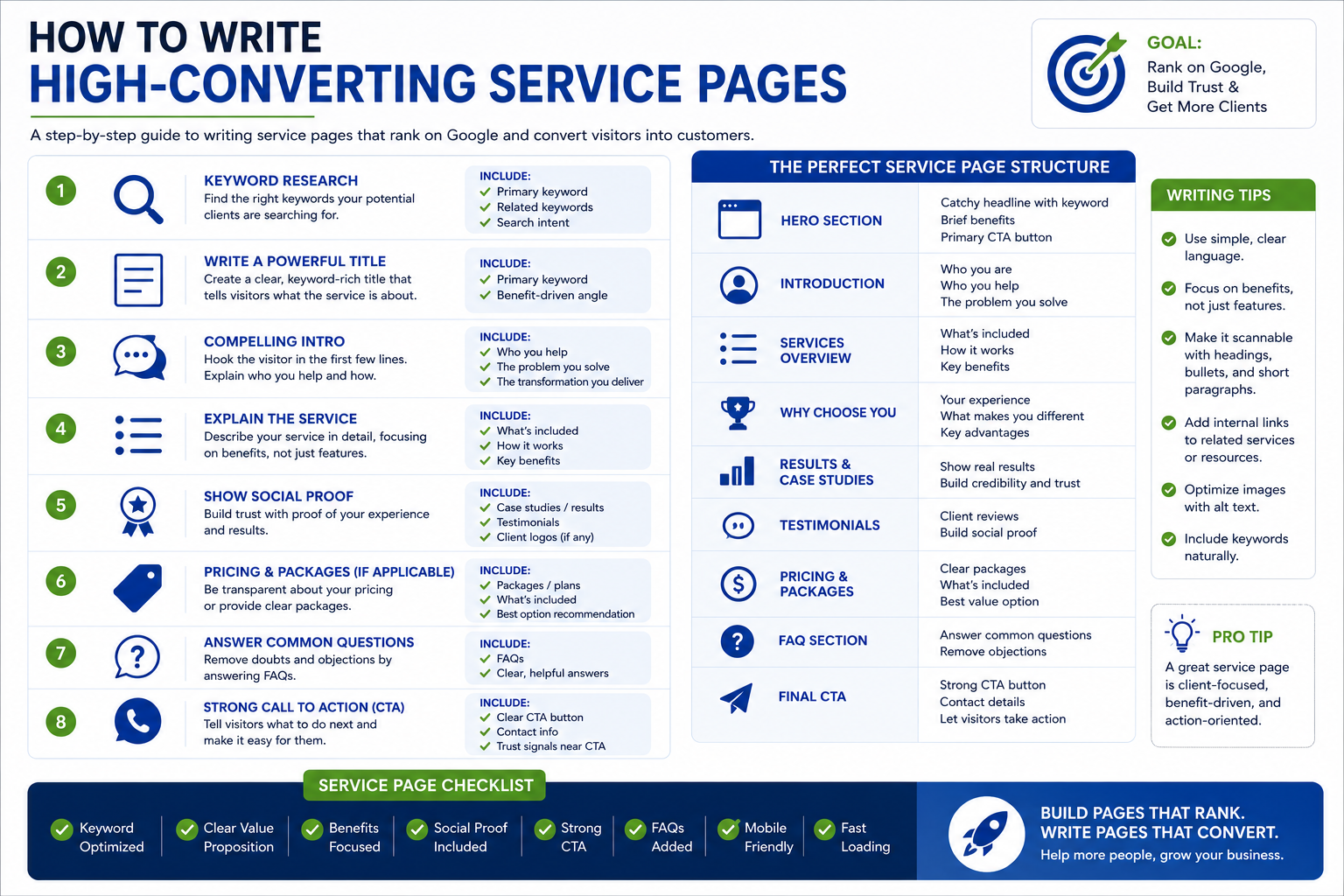
Most service pages fail for one of two reasons. Either they’re written for search engines and read like keyword soup, or they’re written for humans and never rank because there’s no clear keyword mapping, no structure, and nothing for Google to latch onto.
They target real buyer intent, they’re built on a repeatable page structure, and they close with proof and a clear call to action. This post breaks down exactly how to build one section by section with a template you can copy and a real example teardown at the end.
Why Most Service Pages Fail
Before the template, it’s worth naming the specific mistakes that keep service pages stuck on page two.
They target the wrong keyword intent. A service page competing for informational queries (“what is [service]”) will lose to blog posts and Wikipedia every time. Service pages need to target commercial and transactional intent searches from people who are ready to compare providers and buy, not people researching a concept.
They’re one giant paragraph. Dense text with no visual structure gets skimmed and abandoned. Search engines also struggle to parse what the page is actually about when there’s no heading hierarchy to signal it.
There’s no proof. Claims without evidence don’t convert. “We’re the best [service] company” means nothing without a number, a case study, or a named result behind it.
The CTA is buried or missing. If a visitor has to scroll to the bottom to find out how to contact you, most won’t. Calls to action need to appear early, in the middle, and at the end.
One page tries to cover five services. Combining “web design, SEO, and PPC” onto a single page dilutes the keyword focus and makes it impossible to rank for any of them specifically.
Underneath all five of these is a single root cause: the page was written without a clear picture of buyer intent. Someone searching “content writing services for SaaS” isn’t researching what content writing is they already know, and they’re evaluating whether to hire someone. A page built for that visitor looks completely different from a page built for someone still in the research phase.
Fixing these five problems is most of the work. The template below builds the fix into the structure itself.
The Service Page Template, Section by Section
Here’s the structure, in order, that consistently ranks and converts across service-based sites.
1. Hero Section (Above the Fold)
It needs:
- An H1 containing the primary keyword, ideally with a location or niche modifier (“Content Writing Services for SaaS Companies,” not just “Content Writing”)
- One sentence describing the outcome the service delivers not a list of features
- A primary CTA button, visible without scrolling
Keep this section tight. Two or three lines of copy and a button is enough. The hero’s job is to confirm to the visitor, in under five seconds, that they’re on the right page.
2. Trust Bar
Directly beneath the hero, add a compact row of trust signals: client logos, a star rating, years in business, or a client count. This section isn’t for SEO, it’s there to stop the bounce. A visitor who arrived from a search result is still deciding whether to keep reading, and social proof at this stage buys you the next scroll.
3. What the Service Includes
Explain, in plain language:
- Who the service is for
- What’s actually included
- What makes your approach different
This is also where secondary keywords and LSI terms belong: terms related to your primary keyword that signal topical depth to search engines. For a page targeting “content writing services,” that might include phrases like “SEO copywriting,” “blog content,” or “on-brand messaging.” Weave these naturally across two or three short paragraphs. Don’t force them into a single sentence.
4. How It Works (Process)
A numbered process section three to five steps does double duty. It reduces buyer hesitation by answering “what happens after I contact you?
Keep each step to a single short line.
5. Proof Elements
This is the section most service pages skip, and it’s the one doing the actual convincing. Proof elements include:
- Case studies with specific, named results
- Testimonials that reference outcomes, not just satisfaction
- Before-and-after examples or portfolio samples
The difference between “great service, highly recommended” and “increased organic traffic by 42% in four months” is the difference between a page that converts and one that doesn’t. Specific numbers beat vague praise every time.
6. Pricing or Packages
You don’t need to publish exact rates, but some pricing signal tiers, a starting price, or a range filters out visitors who were never going to be a fit and reassures the ones who are. Pages with zero pricing information tend to see higher bounce rates from buyers who don’t want to fill out a form just to find out if they can afford it.
7. FAQs (With Schema Markup)
A well-built FAQ section serves three purposes: it answers the objections a visitor is still holding onto, it captures long-tail search queries and “People Also Ask” placements, and when marked up with FAQ schema it can earn extra visibility directly in search results.
Keep it to three to six real questions, drawn from what buyers actually ask (sales calls and support tickets are a good source). Answer each one directly in the first sentence, then add detail if needed. Don’t stuff keywords here; answer the question first.
8. Closing CTA
Restate the offer and give a low-friction next step: a phone number, a short form, or a request-a-quote button. If there’s genuine urgency (limited availability, a seasonal deadline), it belongs here. The primary CTA should also repeat from the hero and reappear at least once more in the body never making a visitor hunt for it.
How to Map Keywords to Each Section
Keyword mapping is what separates a page that ranks from one that merely reads well. Here’s a simple process:
- Start with one primary keyword per page. This is almost always a commercial or transactional query “[service] company,” “[service] near me,” “hire [service].” If you’re tempted to target three services on one page, split it into three pages instead.
- Place the primary keyword in the H1, the URL slug, the meta title, and once naturally in the first paragraph. Don’t repeat it more than a handful of times across the page; modern search engines reward topical relevance over exact-match density.
- Pull secondary keywords and LSI terms from real search data. Use “People Also Ask” results, autocomplete suggestions, and competitor pages ranking for your primary term to build a list of related phrases.
- Assign each secondary keyword to a specific section, rather than scattering them randomly. The “what’s included” section is the natural home for most of them; the FAQ section is the natural home for long-tail, question-based variants.
- Write for the section’s job first, the keyword second. A sentence that reads awkwardly to fit a keyword will hurt conversions more than it helps rankings.
The goal is a page where every section has a clear keyword job, and the copy still reads like it was written by a person who understands the service because it was.
A Quick Word on Internal Linking
Service pages rarely rank on their own. They rank as part of a cluster: supporting blog content that targets informational queries around the same topic, linking down to the service page, and the service page linking back up to a handful of the most relevant guides. If you’re building out a content plan alongside your service pages, treat the service page as the commercial hub and the blog posts as the supporting spokes, each one built around a keyword that’s one step earlier in the buyer’s research journey than the service page itself.
Real Example Teardown
To see this structure in practice, look at how it plays out on a live service page: MDOB’s own content-writing service page, rebuilt using this exact template as part of our recent service-page expansion.
- The hero targets the primary keyword directly in the H1, with a one-line outcome statement and a CTA button visible immediately.
- The trust bar sits directly below, showing client count and review rating before any long-form copy begins.
- The service explanation section carries the secondary keywords “SEO blog content,” “on-brand copywriting,” “content strategy” spread naturally across two short paragraphs rather than crammed into one.
- The process section answers the most common first question from new clients: what happens between signing up and receiving content.
- The proof section leads with a specific traffic result tied to a named engagement, rather than a generic testimonial.
- The FAQ section answers the three questions prospects ask most often before booking a call, marked up with FAQ schema so they’re eligible to appear directly in search results.
- The CTA repeats three times across the page: hero, mid-page, and footer.
This structure is also why internal linking matters; a service page like this should link out to supporting content that builds topical authority around it, and receive links back from related guides in the same content cluster.
FAQs
How long should a service page be? There’s no fixed word count, but most well-structured service pages land between 800 and 1,500 words once you include the process, proof, pricing, and FAQ sections. Length isn’t the goal, covering every section above thoroughly is. A thin page missing proof and FAQs will underperform a longer page even if it’s stuffed with keywords.
Should I have one page per service, or one page covering everything I offer? One page per core service. Combining multiple services onto a single page dilutes your keyword focus and makes it harder for that page to rank for any one term. If two services genuinely overlap and are usually bought together, a single page can work but if they’re searched for separately, they should be written and optimized separately.
Do FAQs actually help SEO? Yes, in two ways. They let you capture long-tail and question-based search queries that wouldn’t fit naturally into the main body copy, and when marked up with FAQ schema, they can become eligible for expanded results directly in the search listing which increases visibility even without a ranking change. They also address buyer objections in-line, which helps conversion as much as it helps search visibility.
Want service pages built with this exact structure keyword mapping, proof, and FAQ schema included? MDOB’s content-writing service builds and rewrites service pages designed to rank and convert from day one.