
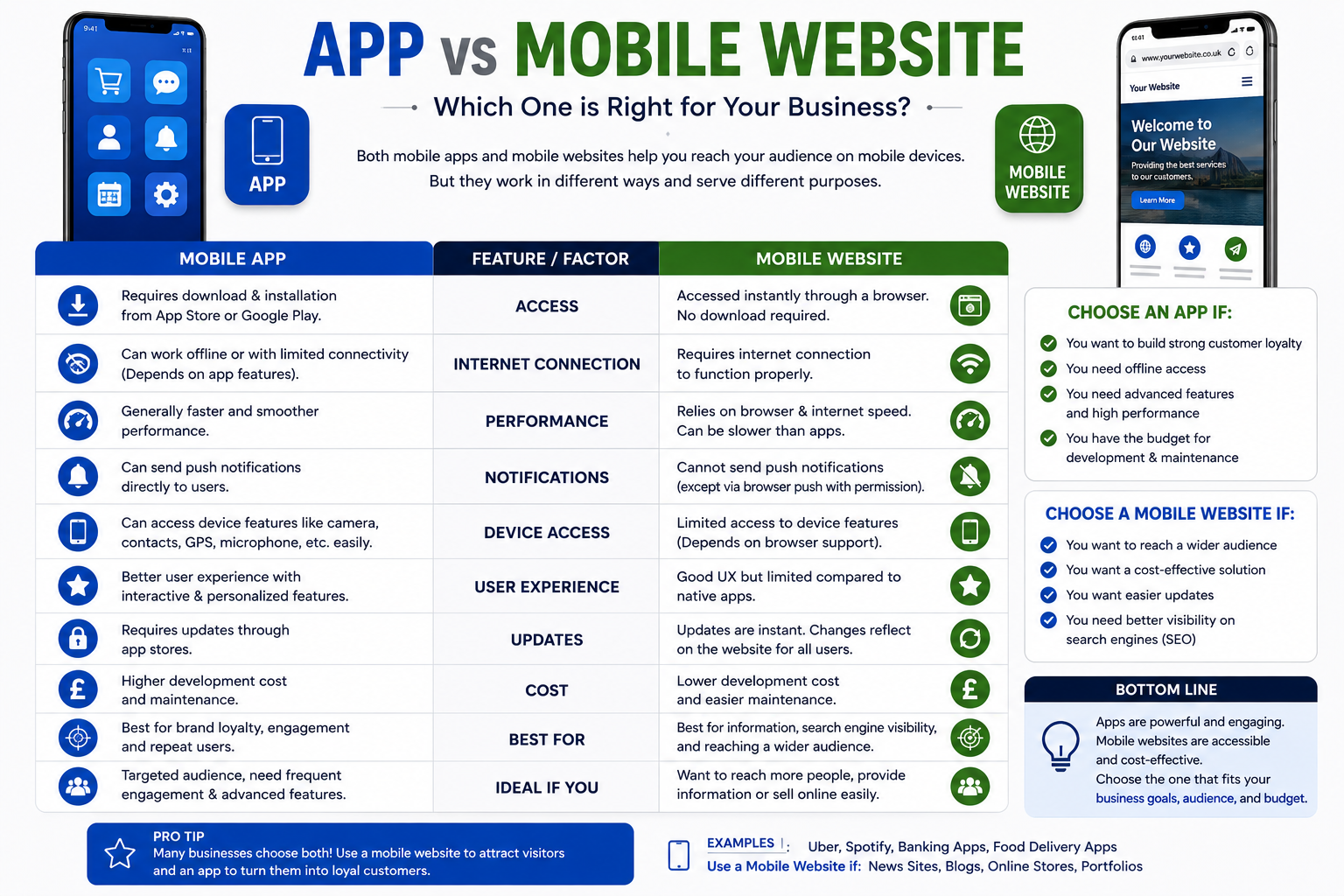
Every few months, someone on the leadership team asks, “Shouldn’t we have an app by now?” It’s a fair question. It’s also, for most small and mid-sized businesses, the wrong first question.
The right first question is: what does an app need to do that a well-built mobile website can’t? Answer that honestly, and the app-or-website decision usually makes itself.
This guide walks through a simple decision framework, when each option genuinely wins, the progressive web app (PWA) middle ground, and what each route actually costs so you can make the call with real numbers instead of a hunch.
The Decision Framework, in Short
Before the detail, here’s the shortcut version:
- If customers mostly need information, browsing, or an occasional transaction a mobile-optimised website wins. It’s cheaper, faster to launch, and reachable by anyone with a browser.
- If customers need to use you offline, need hardware access (camera, GPS, Bluetooth), or you need reliable push notifications a native app earns its cost.
- If you’re somewhere in between want an app-like experience, home-screen presence, and offline basics, but aren’t sure the demand justifies app store development a PWA is the sensible middle step.
The flowchart above is a starting point, not a verdict. Below, each branch gets a proper look.
When a Mobile Website Wins
For most SMEs service businesses, restaurants, clinics, retailers, B2B firms a fast, responsive website covers the job an app would do, without asking customers to download anything first.
The core advantage is zero friction. A website is one tap from a search result, a social post, or a text message. An app asks for a decision, a download, storage space, and often an account before the customer has even seen what you offer. That friction matters more than most SMEs expect: the median app keeps only a small single-digit percentage of the people who install it active by day 30, and roughly nine in ten app users churn out within a month across the industry as a whole. Getting someone to install your app is hard; getting them to open it again is harder.
A website also wins on reach and reversibility. It works on any device with a browser, it’s indexed by Google (an app largely isn’t, unless you invest separately in app store optimisation), and updates go live instantly no waiting on Apple or Google’s review queue.
A mobile website is the right call when:
- Customers mostly look something up, browse a menu or catalogue, or make an occasional booking or purchase
- You want to be found via Google search, not just by people who already know your brand
- You need to launch quickly and iterate based on real usage
- Your budget is better spent proving demand than building infrastructure for demand you haven’t confirmed yet
If you’re not sure whether people would use an app from you at all, the honest move is to make the website excellent first, watch how people actually behave, and let that data not an assumption tell you if an app is next.
When an App Wins
An app earns its cost when it does something a browser genuinely can’t do as well, and when people will realistically come back often enough to make the download worthwhile.
The strongest reasons to build native:
- Offline functionality is essential. Field service tools, delivery driver apps, or anything used in low- or no-signal environments needs local data storage and sync that a website can’t reliably provide.
- Deep hardware access. Camera scanning, GPS-based tracking, Bluetooth device pairing, biometric login, or background location these are native-app territory.
- A ride-hailing app, a delivery tracker, or a loyalty app that lives on real-time alerts needs the reliability native push delivers.
- High-frequency use is something customers open daily or several times a week, where the home-screen icon and faster performance genuinely change behaviour.
- App store presence itself is part of the value of being discoverable and credible in the App Store or Google Play matters to your audience or category (fitness, gaming, fintech), that visibility is worth something on its own.
Even here, retention data is worth sitting with before committing a budget: average day-one retention across categories sits around a quarter of installs, falling to roughly 4–8% by day 30, though categories like productivity, fintech, and workplace tools do meaningfully better than the average. If your use case matches those higher-retaining categories habitual, high-utility, tied to a recurring task an app is a reasonable bet. If it doesn’t, an app can become an expensive icon nobody taps twice.
The PWA Middle Ground
A progressive web app is, technically, still a website but one built to install to a home screen, work offline for at least basic functions, send push notifications on most platforms, and feel closer to native in speed and interaction.
For a lot of SMEs, this is the actual sweet spot: enough app-like behaviour to solve the “can we send them a notification” or “can they use it with patchy signal” problem, without committing to two separate codebases, two app store accounts, and ongoing OS-update maintenance.
What a PWA gets you:
- Installable icon on the home screen, no app store download required
- Offline access to cached content and basic functionality
- Push notifications on Android and, with some limitations, iOS
- One codebase serving both the website and the “app,” rather than maintaining iOS, Android, and web separately
- Instant updates no app store review delay
What it doesn’t fully replace: deep hardware integrations, the polish of a fully native UI on complex apps, and the discoverability boost of a genuine App Store or Play Store listing. If those matter, a PWA is a strong stepping stone rather than a permanent answer.
Cost Comparison
Costs vary a lot by scope, but the ranges below give a realistic starting point for SME budgets.
| Mobile-optimised website | Progressive Web App (PWA) | Native app (iOS + Android) | |
| Typical build cost | Often included in a standard site build, or a few thousand for a dedicated mobile-first rebuild | Roughly $8,000–$25,000 for a small-to-medium build; conversions of an existing site can start lower | Commonly $30,000–$120,000+ for both platforms at simple-to-medium complexity |
| Timeline | Weeks | Six to twelve weeks is typical | Three to six months, often longer with app store review cycles |
| Ongoing maintenance | Standard web hosting and updates | Generally lighter than native one codebase, continuous deployment | Higher typically 20–25% of build cost annually, plus OS update work on two platforms |
| Store fees | None | None | Apple: $99/year developer account. Google Play: one-time $25 fee, plus a revenue share on in-app purchases |
| Update speed | Instant | Instant | Subject to app store review, sometimes days |
The pattern holds across most independent estimates: PWAs typically run somewhere between a third and three-quarters cheaper than building and maintaining separate native apps over a comparable period, largely because there’s one codebase instead of two and no store review cycle slowing releases down.
None of this means cheaper is automatically right. It means the extra cost of native only pays off when the app does something a website or PWA genuinely can’t.
Frequently Asked Questions
Are PWAs cheaper than native apps?
Generally, yes. Because a PWA uses one codebase across devices and skips app store fees and review delays, both build and multi-year maintenance costs tend to land well below equivalent native development commonly by a third to three-quarters, depending on features and complexity.
Do customers actually download apps from small businesses?
Some do, but the honest answer is: less often than SME owners hope. Industry-wide, most app installs go unused within days, and the median app retains only a small share of users by day 30. Unless your business has a strong, recurring reason for someone to open an app weekly a loyalty programme, delivery tracking, a booking system they use often asking customers to download and keep an app is a real ask, not a small one.
Can I start with a website and add an app later?
Yes, and for most SMEs this is the sensible order. Launch or upgrade the mobile website first, watch real usage and repeat-visit behaviour, consider a PWA if you want app-like features without a full native build, and only commit to native development once you have evidence not just a hunch that customers want it and will use it often enough to justify the cost.
Not Sure Which You Need? Ask Us Honestly
If you’re weighing this decision, the most useful thing we can do isn’t sell you an app. It tells you the truth about whether you need one. Book an honest consultation if a mobile website (or a PWA) is genuinely the better fit for your budget and your customers, we’ll tell you that, and build it well. If a native app is the right call, we’ll explain exactly why and what it should include.
Explore our website development services or, if hardware access, offline use, or high-frequency engagement point toward native, our Android & iOS app development services.